Showing posts with label student projects. Show all posts

Friday, October 21, 2011

The Best School Fundraiser

Back in August, I had the pleasure to interview CEO and co-founder of Storybird.com, Mark Ury, on my podcast, The Tightwad Teacher. Storybird is a great site that fosters creative student writing, and I have enjoyed great success when using it in class (click here for my tutorial on the site... click here or here to see some student work). During the conversation, Mr. Ury mentioned that the site had recently opened up a fundraising option. I was intrigued and decided almost immediately that I would make a Storybird fundraiser a priority going in to the 2011-12 school year.

Fundraising with Storybird is simple. First, students create their books. Next, the teacher sets a start and end date for a fundraiser. Finally, when the fundraiser expires, proceeds are automatically transferred to the teacher's PayPal account and books are sent to the school for distribution. It really is that simple.

Students have the option to purchase soft or hard cover copies of their work and the cost ranges from $14 - $30 depending on the length of the book. For each order placed, the classroom receives $5. Compared to the thin margins of profit that come from traditional school fundraisers, this is a great deal. What's even more important is that students are selling something that is meaningful to them and also meaningful to the family members who are purchasing copies. It helps generate funds for the classroom and it gives students the opportunity to feel the thrill of seeing their names printed on a professionally published book.

Earlier this week, my students' books arrived. Simply put, they are proud as hell of their work. With the Storybird fundraiser, we were able to raise $180. We'll be using this money to help fund a lending project from a third world country - more about that here.


Save to delicious Saved by 0 users
Digg Technorati StumbleUpon Reddit BlinkList Furl Mixx Facebook Google Bookmark Yahoo
ma.gnolia squidoo newsvine live netscape tailrank mister-wong blogmarks slashdot spurl

Saturday, October 15, 2011

My Split Personality

I'm currently enrolled in an online class in the Educational Leadership program at Niagara University. A few weeks ago, my professor assigned a "personal portfolio" project. It was essentially a getting-to-know-you activity with a 21st century digital twist. The only requirements were that the project share some personal and professional details with the class, and it did so in a way that was creative and entertaining.

Many of my classmates turned to presentation sites like Glogster, Prezi, and Sliderocket. A few went the more traditional (and boring) route and created PowerPoint presentations. I decided to be a bit ambitious. One evening after the kids were tucked in for the night, I cleared some boxes off an old couch in the basement and made a video portfolio.

I wanted to share my professional goals as well as my personal interests in a way that was memorable. For an hour spent in the basement and another hour tinkering on the computer, I'm happy with the result, so I thought I'd share it on here.

Enjoy!

Save to delicious Saved by 0 users
Digg Technorati StumbleUpon Reddit BlinkList Furl Mixx Facebook Google Bookmark Yahoo
ma.gnolia squidoo newsvine live netscape tailrank mister-wong blogmarks slashdot spurl

Tuesday, August 9, 2011

Fundraising Done Right

Today I helped a man in Kenya buy a cow. I used a lending website called Kiva to perform this micro act of philanthropy.

I guess I’m a bit late to the party because Oprah included Kiva.org in her list of favorite things for 2010, but I have to agree with her. It’s a really, really cool idea. Kiva is a not for profit organization that works with lending agencies in developing countires. These agencies post brief profiles for borrowers, and then Kiva users choose to lend as little as $25 to the person. Projects on Kiva range from purchasing supplies and merchandise for shops to financing indoor pumbling for a family's home.

The great part about Kiva is that your participation is not viewed as a donation. Instead, each borrower profile gives a timeline for when the money will be returned to your account. This money can either be pulled out of the Kiva system or reinvested in other projects. Kiva’s return rate is impressive - hovering somewhere around 97%. Those are pretty good odds that you’ll see you money again.

I think there’s definite educational application for Kiva. Every year students get sucked into countless fundraisers. They sell candy bars, wrapping paper, candles, cookie dough, magazines, etc. The list goes on. The problem with this the focus of the fundraising becomes the act of generating the funds instead of the good cause that the funds are supporting. Kiva is different in the sense that students can see the face of the person being affected by their generosity. This is the crucial step that every other charity/fundraising activity in schools is missing.


This is Peter. I helped him buy a cow for his family.

Save to delicious Saved by 0 users
Digg Technorati StumbleUpon Reddit BlinkList Furl Mixx Facebook Google Bookmark Yahoo
ma.gnolia squidoo newsvine live netscape tailrank mister-wong blogmarks slashdot spurl

Friday, March 4, 2011

Do Typewriters Produce Better Writing Than Computers?


About a year ago, I found a used 1960s portable typewriter for sale. I thought it would be an interesting novelty to share with my students, so I purchased it and brought it in to my classroom. I figured it may peak some interest, but my students’ responses were truly memorable. Several simply had no idea what a typewriter even was; nearly all admitted to never having used one. This was evident when I began to let them experiment on the machine. There were baffled by the missing ability to delete and correct mistakes. One student even apologized after the carriage return bell sounded. He thought he had broken the typewriter!

I was a bit intrigued by the dinosaur as well; I am 29 years old, so other than pounding on my mother’s electric typewriter as a kid, I had no experience with this medium. As a novelty, I decided to write a few blog posts on the typewriter (I later learned this was a niche form of blogging called typecasting). I found that my writing and thought process changed considerably – I was more cautious about syntax and word choice because I was unable to go back and edit, and the length of time it took to write each passage increased simply because my finger dexterity forced me to take my time and firmly strike each key. In the end, my efforts produced a well-thought piece of writing.

I began to wonder how typewriters would affect my students’ writing. After all, a common complaint by teachers is that students rush through writing assignments and are usually hasty when it comes to planning quality responses. I wondered if my district could learn something about teaching the writing process from these archaic machines.

For the past year, I have been slowly accumulating typewriters from community members and friends so that I can use them with my students. I have almost 20 manual typewriters dating from the 1930s to the early 1980s.

This Spring I am planning a writing project to determine the affects of manual typewriters on demand writing tasks. Judging by my own experiences, I predict that the quality and depth of the responses will be better for students who type using a manual typewriter rather than a laptop.

By no means am I suggesting schools abandon computers for typewriters; rather I feel that a lot can be learned by examining how students write using these devices. As more schools move toward a 1:1 environment, this information will become invaluable.


Save to delicious Saved by 0 users
Digg Technorati StumbleUpon Reddit BlinkList Furl Mixx Facebook Google Bookmark Yahoo
ma.gnolia squidoo newsvine live netscape tailrank mister-wong blogmarks slashdot spurl

Monday, January 10, 2011

The Outsiders Final Project - Facebook

I look forward to teaching 7th grade for one reason – reading The Outsiders by S.E. Hinton. It’s a classic piece of adolescent literature that every kid can relate to on some level. I like to read it with my classes early in the year because it is something that they tend to rally behind and I can usually ride out the enthusiasm it creates until after the Winter recess. This year marks the fourth time I have taught the book, and while I now have a drawer filled with lessons and handouts, I have never been able to find a suitable project to use as a conclusion to such a magnificent read.

Until now.

Students are creating a mock Facebook account for a character from the book. The project is a grand slam; it is rigorous and relevant to the book, but also collaborative and highly engaging. Students were asked to choose one of three main characters – Johnny, Ponyboy, or Dally – and create a Facebook wall complete with status updates and replies from other characters. These posts should demonstrate their understanding of important events in the book as well as the complex relationships between characters. Students have really stepped up to the task and I have been impressed by their overwhelming creativity and ability to approach a text from a different perspective.

For the project, I created Facebook templates with Photoshop. Since my students watched the 1985 movie version of The Outsiders, I included headshots from the theatrical release to serve as profile pictures. All students had to do was manipulate text boxes that were included in the template. To help troubleshoot, I also made a quick Jing tutorial video demonstrating how they should create their project. Click here to view it.

If you would like to use this project with your students, here is a zip file of all the documents you will need. I also uploaded my project outline sheet to Scribd.com. Feel free to download it!
The Outsiders Facebook Project


Save to delicious Saved by 0 users
Digg Technorati StumbleUpon Reddit BlinkList Furl Mixx Facebook Google Bookmark Yahoo
ma.gnolia squidoo newsvine live netscape tailrank mister-wong blogmarks slashdot spurl

Tuesday, December 21, 2010

Is there a Movie for this Book? (And other frustrations with film adaptations)

The worst part of reading with students is the inevitable question that is always asked: Is there a movie for this? For ELA teachers, this is equivalent to telling Bobby Flay not to bother with dinner because you would prefer to order a pizza and wings.

Most stories we read in class do have movie adaptations – if they are good enough to dedicate class time reading, they were probably good enough for someone to make into a movie. I don't like showing the movie out of obligation, and the typical movie/book-compare/contrast activity is near worthless in my opinion. To make matters worse, the availability of a movie doesn't necessarily mean its any good. Some movie versions of books are quite awful – take the 1981 made for tv adaptation of Todd Strasser's book The Wave, for example. (After starting the movie, kids actually complained about having to finish it.) But any teacher who admits that a movie exists but refuses to show it will face a potential mutiny in his/her classroom.

So how can teachers use a movie version of a story as a valuable resource rather than a frivolous time-killer?

I was faced with this question several weeks ago after reading Shirley Jackson's classic short story, The Lottery. I was teaching a unit on setting, mood, and tone, and I felt this story would work nicely in exploring how these elements work together. The kids loved the story, but I was not sure how to wrap up the unit. The Lottery film adaptation from the 1960s is dated and kind of slow moving, but my students insisted they see it anyway.

The film version is only about 20 minutes long, and as I watched it with the class I again noticed how drawn out the story was. I realized that it could probably have been boiled down to three minutes of actual substance – and this gave me an idea.

After watching the movie, my class agreed that the movie did not do justice to the story. I told them that the final assignment for The Lottery was to create a music video that accurately portrayed the setting, mood, and tone of the story. They could use any song they'd like that they thought fit those requirements, but they only video footage they were allowed to use were clips taken from the film.

To do this, I found the complete film posted on Youtube. I downloaded it from there using Keepvid and then converted it to a usable format with Format Factory. From there, students used Movie Maker to cut and splice what they considered to be important scenes together to fit with the soundtrack.

The group took to the technical labor of this assignment much quicker than I anticipated. It was also interesting to see the variety of songs they were able to successfully apply to the film. We had everything from Tom Jones to Bob Marley, but they all managed to edit the film in such a way to meet the needs of their songs. I was impressed.

This worked especially well with The Lottery, but I could also see it being an excellent culminating project for other short stories (with bad movie adaptations) – The Tell-Tale Heart, Occurrence at Owl Creek Bridge, maybe even novels like The Outsiders, if broken down by chapter. The beauty is that all of these are available on Youtube, so finding the raw materials your students need is not very difficult.

Obviously, this treads dangerous copyright ground, so you may want to refrain from posting students' finished work. I, however, am not heeding my own warning – here is the sample project I made for my students to use as a reference. I made sure to disclose that I am not the owner of any of the materials – the song is Know Your Enemy by Green Day, and the movie is The Lottery, directed by Larry Yust.


Save to delicious Saved by 0 users
Digg Technorati StumbleUpon Reddit BlinkList Furl Mixx Facebook Google Bookmark Yahoo
ma.gnolia squidoo newsvine live netscape tailrank mister-wong blogmarks slashdot spurl

Tuesday, September 21, 2010

Using ZooBurst in the Classroom

It seems like at the start of each school year, there's one new web app that I cannot wait to try with my students. In past years it was Glogster, or Storybird. This year, it's ZooBurst.

ZooBurst creates interactive, 3D pop-up books. In addition to this, it can also be viewed in Augmented Reality mode with the help of a webcam. After printed a special paper from the ZooBurst site, the webcam captures you and "projects" your pop-up book onto the paper you are holding. While this technology is fledgling and not without its major flaws, it is still quite fun to play with, and really lends nicely to the concept of a 3D pop-up book.


Holding my "book" in Augmented Reality

Here is a ZooBurst I made for my team's webpage. I thought this was a much nicer way to provide contact information for parents. The book can be rotated and viewed from different angles by holding down the left mouse button. Clicking on the exclamation points displays the contact info.


I made a tutorial my students when it comes time for them to start their own ZooBursts. Feel free to download and use it in your own classroom!

ZooBurst Tutorial
Save to delicious Saved by 0 users
Digg Technorati StumbleUpon Reddit BlinkList Furl Mixx Facebook Google Bookmark Yahoo
ma.gnolia squidoo newsvine live netscape tailrank mister-wong blogmarks slashdot spurl

Monday, May 10, 2010

How to Make Stop Motion Movies in 4 Easy Steps

Despite stop motion video reaching its peak in the long-forgotten era of Gumby and Davey and Goliath, it is a film technique that is simple and powerful. It is very cheap to produce and requires creativity and problem solving skills – all excellent reasons to use it in class with students!

For my stop motion video, I used my Flip Mino, but really any camera capable of taking videos will do the trick. Here is how to make a stop motion video in four easy steps.


Step 1 – Set the “Stage”

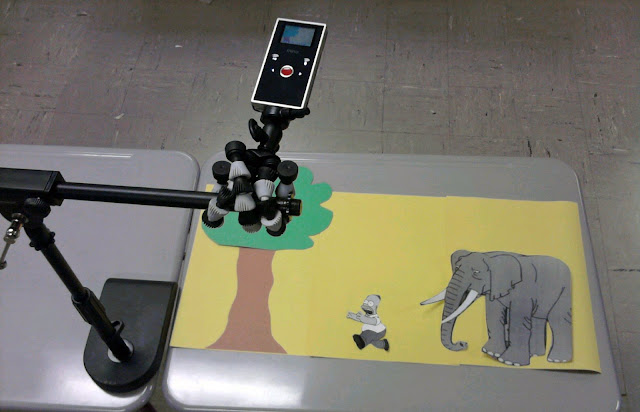
Before filming, decide how the stage will appear. Choose props, characters, word bubbles (if needed), and background scenery for your movie. For my sample above, I used magnets on a dry erase board. I mounted my camera parallel to the board. The below example shows another possible method for setting the stage. I used a desktop microphone stand and a flex grip camera mount to position the Flip directly over the scene. Choose whichever method is going to make filming your scene easiest.


Step 2 – Record your Scene

Back in the early days of stop motion, every frame was photographed individually. This was laborious and often riddled with mistakes – the slightest bump of the camera would create a major discrepancy in the final movie. Today, thanks to digital video, there is an easier way. Instead of taking digital pictures frame by frame, simply press record on your video camera. Now move your characters every so slightly and then remove your hand from the shot. Wait a second and repeat. Pay attention to your shadow – you don’t want it inadvertently finding its way into your finished film!

Step 3 – Create Snapshots from the Raw Footage

Once you have inched your way through the scene, it’s time to create snapshots. This can be done with any video editor, but I found it especially easy using Windows Movie Maker. Simply import the video into the timeline and press play. Stop at any point where you want to create a snapshot, then choose “take picture from preview” from the tools menu. I saved my pictures in sequential order to make it easier to import later. The raw footage for my dinosaur sample was almost 8 minutes long, but after omitting shots I didn’t want I was able to condense it down into about 60 snapshots.


Step 4 – Import Snapshots

After you have your snapshots, you can delete the raw footage from the timeline. Before importing the snapshots, you will have to determine how long you wish each one to display for. Go to options in the tools menu and change the duration to .25 seconds (feel free to experiment with the length of time). Now you can select all of your snapshots and drag them into the Movie Maker project. If there are frames that you want displayed longer than others, you can manually change the length by clicking on the outer edge of the snapshot and dragging it to the desired length. When your stop motion video is complete, save as a movie just like you would any other Windows Movie Maker project!


Save to delicious Saved by 0 users
Digg Technorati StumbleUpon Reddit BlinkList Furl Mixx Facebook Google Bookmark Yahoo
ma.gnolia squidoo newsvine live netscape tailrank mister-wong blogmarks slashdot spurl