Tuesday, November 3, 2009

What's Next for Digital Natives?

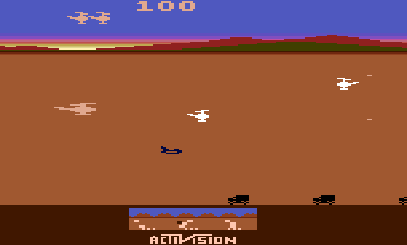
At only about 4 years of age, I can remember sitting in front of the bulky console television playing my parents' Atari game system. I knew how to change cartridges and turn the thing on. Some games, I even knew how to play (All I could get my triangular spaceship in Asteroids to do was spin recklessly in the center of the screen, but I was a champ at Chopper Command). I don't think my folks ever sat down with me and taught me how to play - I just knew.

Chopper Command - Still the coolest Atari game ever

Almost 25 years later, I am now experiencing this from the other side of the fence. My 2-year-old daughter Sophie smuggled my new iPod Touch from the counter last night. Curious to what she would do, I opened up Doodle Buddy, a free drawing app I had downloaded earlier in the evening. It's simple to use – draw with your fingers and shake to clear the screen. Within minutes, Sophie had is all figured out. I didn't really have to teach her – she just knew.


Although Marc Prensky first coined the term digital native in 2001, I associate it with the work (and recent webinar I attended) of author Don Tapscott. The term is used to broadly define the current youth generation:

A digital native is a person for whom digital technologies already existed when they were born, and hence has grown up with digital technology such as computers, the Internet, mobile phones and MP3s.

Sophie certainly fits the definition of a digital native, but I think it's fair to say she doesn't belong to the same population that Tapscott and Prensky were writing about. Sophie's generation has yet to be defined. What will it be – digital native 2.0? The Networked Generation? The Wifi Child?

Regardless of the name, this generation undoubtedly has a lot to look forward to.
Save to delicious Saved by 0 users
Digg Technorati StumbleUpon Reddit BlinkList Furl Mixx Facebook Google Bookmark Yahoo
ma.gnolia squidoo newsvine live netscape tailrank mister-wong blogmarks slashdot spurl

Monday, November 2, 2009

Review of OpenOffice for Kids - OOo4Kids

There has been some buzz lately about a student-specific productivity suite called OpenOffice for Kids (or OOo4Kids) and considering my recent blog post pushing for the use of OpenOffice in schools, I felt the need to give it a good looking over.

Just like OpenOffice, the OOo4Kids word processing software is called Writer, and is completely compatible with Microsoft Word. It can save files with many different extensions including .doc, .rtf, and OpenOffice's native .odt. Because it's based on OpenOffice 3.0, there's no added features exclusive only to Ooo4Kids, so pretty much all the pros I listed in my early blog post apply to OOo4Kids as well.


The biggest advantage is an optimized layout directed at the tasks most often performed by children. Take a look at the side-by-side comparison of the default toolbars in OpenOffice and OOo4Kids. It's streamlined with only the most common icons active. I'm curious how it was decided what would make the cut because several tools that I find rather important (italics, bold, and underlined, for example) are missing.

Tools can still be added to the toolbar by manually activating them, but I don't think this is the kind of configuration the targeted audience is easily capable of performing. For example, to add a table in OpenOffice, go to Insert in the top menu and select table. This is missing in Ooo4Kids. Instead, here are the instructions from the help tutorial on creating a table:
To set the Behavior of rows/columns options for tables in text documents, choose Tools - Options - OOo4Kids Writer - Table, or use the Fixed, Fixed/Proportional, and Variable icons on the Table Bar.
I'm on the fence about the need for a student-specific version because I never really found OpenOffice that difficult to use in the first place. I don't teach at the elementary level, however, and that's where OOo4Kids is really intended. If the goal of the project was to create a simpler, more streamlined version of OpenOffice, then they succeeded. The problem, however is that the usefulness of tools is subjective.

Like all things open source, OpenOffice for Kids can be configured to your liking, and will surely improve as a community of users grow around it. And hey - If it's another advantage to adopting OpenOffice over Microsoft Office (since there is no student-friendly flavor), then I'm all for OOo4Kids.
A screenshot of OOo4Kids in action
Save to delicious Saved by 0 users
Digg Technorati StumbleUpon Reddit BlinkList Furl Mixx Facebook Google Bookmark Yahoo
ma.gnolia squidoo newsvine live netscape tailrank mister-wong blogmarks slashdot spurl

Sunday, November 1, 2009

Eat Dinner with Your Family!

When my wife and I first got married (it'll be four years in April!), my mom gave us one simple piece of advice – never eat dinner with the television on. She reminded us that dinner was a time to catch up with each other's lives; a time to ask How was your day? We've followed her advice, and I feel our lives are better for it.

Today (while not eating a meal), a commercial for Stouffer's caught my attention. They had taken my mom's words of wisdom one step further by suggesting that kids who eat dinner with their families are destined to do better in school, be more successful, and stay out of trouble. Wait a minute, Stouffer's, I think you're manipulating data here.

Am I arguing that eating dinner every night as a family is important? Absolutely not – I wholehearted agree that it's important to establish that as part of the daily routine. But I'm having a hard time swallowing the assumption that sitting down to a sodium-delicious Stouffer's meal will improve a kid's work habits at school. I remember a similar scenario appearing in an Educational Psychology course I had to take in grad school. It went like this - If wealthy families tend to own small dogs, then can it be assumed that small dogs are an indicator of wealth? I don't remember the exact term – some form of causation or correlation – but the same applies to families who eat dinner together. It's not the meal that causes the kids to do well, but the fact they come from a family who has it together enough to know that it's important to share in the lives of the people you love.

I'd like to know the percentage of families who still eat together. I'd assume it's lower than we expect. But in the end, if it takes a commercial campaign to make it happen, I'm okay with that. It's not quite as sentimental as your mother sharing her advice on your wedding day, but the message is clear. It's important to eat as a family, share as a family, and listen as a family.

Here's the commercial, or you can visit the commercial campaign site (dubbed "Let's Fix Dinner") here.

Save to delicious Saved by 0 users
Digg Technorati StumbleUpon Reddit BlinkList Furl Mixx Facebook Google Bookmark Yahoo
ma.gnolia squidoo newsvine live netscape tailrank mister-wong blogmarks slashdot spurl

Thursday, October 29, 2009

Am I a Selfish Blogger?

I read a post on CopyBlogger today titled "The 3 Fatal Diseases that Kill Good Blogs." I don't know if my blog constitutes as good but I have learned a lot since I started posting to it nearly 7 months ago. I keep an eye on the guest counter so I know at least some people are visiting, and it just tickles me when one of my blog posts gets retweeted. That's why I was eager to make sure I wasn't leaving myself open to a blog-fatal infection.

The first two diseases focused on folks looking to make their blog into a profession, so that simply didn't apply to me. The third in the list made me think, however.

Here's how the post described it:

The Selfish: These bloggers just don’t see the point in networking or in spreading goodwill. They certainly don’t take the time to foster relationships that can help them reach the next level, including creating a solid relationship with their audience.


Am I guilty of being a selfish blogger? I didn't think so at first. I'm pretty active on Twitter both in tweeting my own posts, and retweeting others, but does that count as spreading goodwill? I almost always respond to comments left on my blog and I try to comment of blog posts of others that I find interesting. That counts a fostering relationships, right?

But something about the last part of the selfish blogger description left me feeling a bit guilty. I keep a list of blogs saved to my favorites, but I don't make them public. I don't have a blogroll on my blog.

I know how excited I get when I spot my blog listed on someone's site. I should give credit where credit it due to the blogs that I enjoy reading.So I've decided to add a blogroll.

Maybe I have been a little selfish.
Save to delicious Saved by 0 users
Digg Technorati StumbleUpon Reddit BlinkList Furl Mixx Facebook Google Bookmark Yahoo
ma.gnolia squidoo newsvine live netscape tailrank mister-wong blogmarks slashdot spurl

Wednesday, October 28, 2009

Modeling How to Use the Flip Camera with Students

Every day, my team begins our daily meeting by entering homework into the team calendar on our school website. It's a nice way to communicate to parents, and also serves as a way to hold kids accountable when they are absent. Understandably so, it's not the most popular page on the website. Based on a quick poll in class, I'd guess less than a third of our kids frequent it more than once a week.

I'm trying to change that. For the past week, I've been taking the last 10 minutes of my silent reading group and filming skits with them that go along with the day's homework. It's giving me practice with my new Flip camera (yesterday's post explained how I got it), and since I upload the finished movie directly into the calendar, I'm assuming more kids are visiting it from home.

Right now the skits are more about the message than the process. I'm the one who writes up the dialogue, and the one who records and edits the video. But I'm hoping by modeling this process on a daily basis, students will soon be able to take over the task. Actually, that's already happening. Today, several students knocked on my door to ask if they could borrow the Flip for a Social Studies project.

Those kids probably aren't going to check the homework tonight, but I can guarantee they wouldn't have thought of adding a technology piece to their project if they hadn't seen how it was done first.

Here are our video skits for the last two days. I hope you enjoy!


Save to delicious Saved by 0 users
Digg Technorati StumbleUpon Reddit BlinkList Furl Mixx Facebook Google Bookmark Yahoo
ma.gnolia squidoo newsvine live netscape tailrank mister-wong blogmarks slashdot spurl

Tuesday, October 27, 2009

4 Ways Flip Cameras are Better than Digital Video Cameras


Last week I was chosen to be a participant in a 2-year study on using a Flip Mino video camera in the classroom. Admittedly, I know very little about the Flip but I've been using digital video cameras in my classroom for a long time, so I really didn't see the big deal.

Even though my Flip Mino has only been out the box for about a week, I've already noticed some definite advantages to using it versus a traditional digital video camera.


Portability
I'm fortunate to teach in a district that has a healthy technology budget, so digital video cameras have been accessible for years. When a teacher needs to sign one out, they head to a storage cabinet where each camera is stored in it's own insulated lunch sack. Although it's a more economic way of keeping things safe, you can't help feel like a bit of a dork walking down the hall with it. Look at the picture below. Think about taking one of those bags with you on a field trip. You're already holding your own lunch, the first aid kit, a stack of permission slips, student health alerts, and all the other things entrusted to a chaperone. Do you really want to carry a video camera in a lunch box too? The Flip's size is one of its biggest strengths. I could easily carry a dozen of them in one of those sacks (although I'd still feel like a dork).


Transfer
Like most media devices, the Flip camera comes with software to help edit and manage your work. The advantage, however, is that the software is loaded onto the camera and can quickly be installed onto any computer that it plugs in to. No more losing installation CDs minutes after opening the box. You need no accessories, adapters, firewire cables, or attachments. To upload, flip (hence the name) the usb connector out, and plug it in. Done. The Flip is like a portable, traveling movie studio.


Cost
The MSRP for the Flip Mino (which is what I have in my pocket right now) is under $150. The high definition version is under $200. Considering the fact that it was first released just over a year ago, and the effect of Moore's Law on things like this, imagine the capability/cost ratio in a few years.


Ease of Use
There's an on button. And a giant red record button. To give you an idea of how easy it is to use the Flip, here is a video my daughter took. She's two years old. If a two-year-old can do it, so can you.

Save to delicious Saved by 0 users
Digg Technorati StumbleUpon Reddit BlinkList Furl Mixx Facebook Google Bookmark Yahoo
ma.gnolia squidoo newsvine live netscape tailrank mister-wong blogmarks slashdot spurl

Monday, October 26, 2009

Why Schools Should Use Open Office


Open Office is a free and open source alternative to the Microsoft suite of applications. It is available for download at openoffice.org


I first began using Open Office several years ago when I cleared Windows off of my home laptop in favor of Ubuntu Linux. I didn’t really have much choice in office suites considering Microsoft applications are unable to run on a Linux platform. The transition was easy though, and I soon found myself preferring Oo to the Microsoft suite.

Imagine my excitement when I learned that my school district was ready to begin implementing Open Office in the classroom. Today I attended the training for volunteers. A bit redundant for me? A bit. But it’s exciting because it’s my district’s first step in shifting student learning away from proprietary word processing software to open source – a change that is such a no-brainer that it amazes me that every district has not done so long ago.

Here are my reasons why every school should consider Open Office before devoting a large chunk of their technology budget to Microsoft licensing:

Pros/Cons
I began the workshop by making two columns in my notebook. I figured the day would make for an easy blog post outlining the pros and cons of using Open Office compared to the Microsoft suite of applications. As the day progressed, the columns remained pretty much empty. Comparing the two isn’t like comparing apples to oranges, but like comparing Granny Smith to Red Delicious. The skin’s different and the overall taste may be a bit off, but it’s the same thing. Sure, there’s minor differences, but with each negative comes an equal positive. For example, Open Office’s word processing application, Writer, cannot open Docx files formats (standard in Word 2007), however it has the built in function of converting a document to a pdf. Is the negative or the positive more significant? It’s nit-picking at that point.

Versatility
We should be teaching students the skills, not the program. If students only learn by using Microsoft Word, how much are they learning about using the program versus how much they’re learning about improving their ability to create written pieces on the computer? In theory, they should be just as successful whether they are using Open Office, Microsoft Word, Corel WordPerfect, or even something bare bones like Dark Room. Plus, in today’s struggling economy, it’s naive to think none of them will ever work for a business that is unable to afford high end proprietary software.

Price
My favorite explanation of open source software is that it’s free – free as in freedom, because it can be modified by anyone, and free as in free beer, because it costs nothing. It takes about 2 minutes to download, and another 2 to install. In those 4 minutes, Open Office can save a district thousands of dollars in Microsoft licensing fees.

Why aren’t more schools doing this?!
Save to delicious Saved by 0 users
Digg Technorati StumbleUpon Reddit BlinkList Furl Mixx Facebook Google Bookmark Yahoo
ma.gnolia squidoo newsvine live netscape tailrank mister-wong blogmarks slashdot spurl